Monday, August 3, 2009

Google Chrome 3.0: Obesity as a Way of Life

We received a tremendous response to our previous series of entries documenting the expansive memory requirements of today’s multi-process web browsers. At the time, Internet Explorer 8.0 had just entered its second beta release, while Chrome 1.0 was still under wraps at Google. Both proved to be massive memory hogs, requiring tens of megabytes of RAM to render each opened tab.

Eight months later, and the web browser landscape has changed dramatically. Internet Explorer 8.0 is now a shipping product and bundled with Windows 7, while Chrome 2.0 is currently Google’s latest “soft RTM” version of their nascent browser (with version 3.0 undergoing a very public beta). Meanwhile, the Mozilla folks have shipped a major update in version 3.5 – though, like its predecessors, it remains a single-process application.

Given the number of recent developments, we felt it was time to revisit our original test series and to update the data points to reflect the new “state of the art” in both browser and OS technology. Using the same set of eleven target web sites, and updating the OS (Windows 7 RTM) and browsers (Chrome 2.0.172.39, IE 8.0.7600.16385, Firefox 3.5.1) to the latest versions, we once again executed our test methodology.

Note: As before, we relied on the free tools and resources of the exo.performance.network to monitor and record system and process metrics from each test scenario.
image

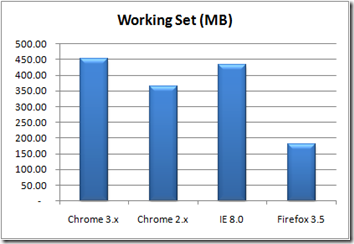
Figure 1 – Browser Working Set (MB)

The first thing to take away from this latest data set is how Chrome 2.0 is now more RAM-efficient than IE 8.0. Previously, Chrome was slightly “fatter” than IE 8.0, at least in terms of shared code (Working Set). However, in our revised testing, Google’s browser consumed roughly 18% less RAM when rendering the same pool of web sites in a multi-tab (one site per tab) configuration.

Unfortunately, Google’s victory was short lived as the latest beta release (3.0.196.0) of Chrome 3.0 proved to be quite a bit hungrier in terms of RAM consumption. Chewing up an impressive 451MB of RAM, Chrome 3.x easily out-gobbled IE 8.0 by 5%, and topped its own immediate predecessor, Chrome 2.0, by 24%.
image

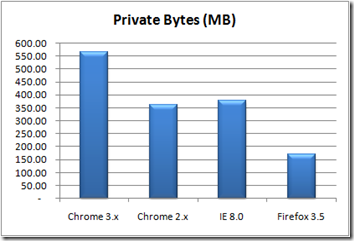
Figure 1 – Browser Private Bytes (MB)

Things looked even worse for Chrome 3.0 when the discussion shifted to Private (i.e. non-shared) Bytes. Here, Chrome 3.0 consumed a staggering 565MB of RAM – a half-gigabyte – while rendering our target site list. By contrast, Chrome 2.0 used just over 360MB, while IE 8.0 chewed-up 378MB to render the same sites.

Of course, we would be remiss if we failed to mention how the latest iteration of the single-process Firefox measured up to its multi-process competitors. In terms of Working Set size, Firefox consumed roughly half as much RAM as Chrome 2.0, and a third as much as Chrome 3.0. Needless to say, if you’re looking for the mainstream browser with the lightest RAM footprint, Mozilla’s Firefox 3.5 is still your best option.

Bottom Line: Google’s browser-cum-OS project has once again reset the bar for “fattest”Internet application. In its current incarnation, the Chrome 3.0 beta consumes roughly three times as much RAM as Firefox, and even outpaces the bloated IE 8.0 in the race to consume all available memory. Given the above revised data points, we can’t help but fear for any future (e.g. Chrome OS) that involves Google as the primary architect of our system software.

Read more...
Friday, July 31, 2009

Windows 7: Don’t Wait for SP1

IT organizations considering their long-term Windows deployment plans should forgo the conventional “wait for Service Pack 1” wisdom and instead move directly to Windows 7 upon its release. That is our conclusion based on an analysis of the RTM build. Using the tools and resource of the exo.repository, we put Microsoft’s new OS through its paces and came away satisfied that it is indeed ready for immediate deployment.

Factors we considered include:

  • Architecture – Windows 7 is architecturally nearly identical to Windows Vista. Most changes are superficial, with the core kernel structures and driver model carried over from its immediate predecessor. This lack of code “churn” at a base level should translate into a relatively clean release, with none of the stability and/or compatibility issues that plagued the RTM build of Windows Vista.

  • Performance – Windows 7 performs almost identically to Windows Vista with Service Pack 2. Testing by DMS engineers shows that Microsoft’s new OS executes linear tasks (OfficeBench) roughly 3-5% faster than Vista while consuming slightly less (8%) memory and spawning fewer (5%) execution threads. However, Windows 7 still lags behind Windows XP by 20-25%, placing it squarely in the Vista-based OS camp in terms of real-world system requirements.

    This is actually a good thing. The PC ecosystem is just now catching up with Vista’s hefty requirements, so delivering an OS that improves on Vista’s capabilities, while maintaining its overall hardware footprint, is a significant accomplishment, especially for a company not generally known for its coding prowess.

  • Compatibility – With its limited changes at the kernel level, Windows 7 provides nearly perfect backwards compatibility with Windows Vista. Most Vista-compatible drivers and services run flawlessly under Windows 7, while applications that have been modified to work with Vista’s User Account Control (UAC) will generally work without incident under Windows 7’s less stringent (in its default configuration) implementation.

    Add to this the availability of Virtual Windows XP Mode and Windows 7’s compatibility story is far stronger that Vista’s when it was first released. Organizations that have been exploring their Vista upgrade options should find Windows 7 to be essentially interchangeable with its older sibling.

Overall, we feel that Windows 7 is a solid release and is sufficiently polished that IT organizations can ignore conventional wisdom and deploy it in its initial RTM state.

Note: Register today for your free exo.performance.network portal account and gain access to all of the tools and resources mentioned in this blog entry.

Read more...

Thursday, January 15, 2009

Passing the 10K User Mark

It’s official: The exo.performance.network recently registered it’s 10,000th contributing site. We can now state confidently that the exo.repository has truly reached a critical mass level, with live metrics data streaming in via Windows systems from every corner of the globe.

Now that we’re passed our initial community building stage, expect more frequent updates to the exo.blog as we begin to sift through the mountains of data to bring you the critical trends and candid observations that only the exo.performance.network can deliver.

A special thanks to all of our users, without whom this important milestone would not have been possible. Stay tuned!

Read more...

New Whitepaper on Application Virtualization

We’re pleased to announce the release of our first white paper from the exo.performance.network project. Titled “Application Virtualization 2008/2009,” this original research deliverable provides a comprehensive look at the execution overhead and runtime performance characteristics of the leading application virtualization solutions from Microsoft, VMware, Citrix and Symantec.

Highlights include:

  • A detailed analysis of system and process-level overhead, including agent-related CPU and memory consumption.
  • Extensive OfficeBench benchmarking data derived from our own DMS Clarity Studio testing framework.
  • Planning and deployment recommendations for IT shops considering application virtualization technology.

You can download the white paper here (PDF). For more information on the exo.performance.network or DMS Clarity Studio, please visit our web site: www.xpnet.com.

Read more...

Thursday, September 4, 2008

IE 8/Chrome Follow-Up

After posting our controversial findings about memory usage under IE 8 and Chrome (see previous post here and here), we received feedback from some our our readers criticizing our use of the Process\Working Set counter values to size the various browser processes. The complaint was that this counter does not factor code (OCX, DLLs, et al) shared across the various process instances.

Fortunately, the DMS Clarity Tracker agent also collects the Page File Bytes counter for each process (i.e. the “Private Bytes” counter as represented in Task Manager), which is a more accurate measure of the RAM footprint (as backed by reserved page file space) of each process instance. And indeed, PF Bytes paints a slightly different picture than Working Set.

image 
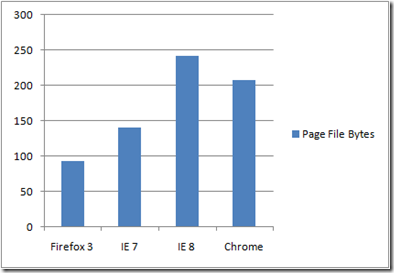
Figure 1 – Page File (i.e. Private) Bytes under Windows XP

For starters, IE 8’s average memory consumption under Windows XP, as tallied across all process instances, drops from 271MB to 242MB when viewed through PF Bytes. Likewise, Chrome’s total process working set (i.e. all 12 instances) drops from 267MB to 208MB, while Firefox’s single process footprint goes from 104MB to 94MB. Interesting, IE 7’s Working Set and PF Bytes values are almost identical – it appears to be sharing nothing with any other process.

image
Figure 2- % Shared Code Across All Browser Instances

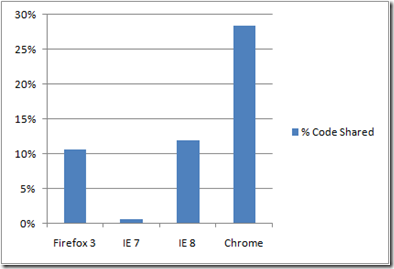
In a way, we’re glad that we received the aforementioned critical feedback because it forced us to take a look at the level of code re-use present in each competing browser. And here is where Google’s clean design reaps real dividends: By comparing the total Working Set and PF Bytes values, we can conclude that Chrome is sharing roughly 28% of its code image across its various instances. Compare this to IE 8 (12%) and Firefox (11%), and you begin to see why its sometimes better to start with a clean slate.

Bottom Line: IE 8 is still “fat” by any measure, while Google Chrome’s “chubbiness” is offset somewhat by its more efficient use of shared code across process instances.

Read more...

Wednesday, September 3, 2008

Google Chrome the “Fattest” of them All

Earlier this week, we posted our findings from a 3-way browser comparison we had conducted featuring Internet Explorer 7, Internet Explorer 8 (Beta 2) and Firefox 3.01. As we were going to “print,” we learned that Google was readying its own foray into the browser market – Google Chrome – prompting us to quickly revisit our test scenario to add this high-profile newcomer to the mix.

Note: For more information on the exo.performance.network, or to register for your free Analysis Portal account, visit www.xpnet.com.

What we found was truly shocking: After re-executing our 10-site, multi-tab scenario across all 4 browsers, we discovered that it is Google Chrome, not Internet Explorer 8, that is the true memory consumption leader.

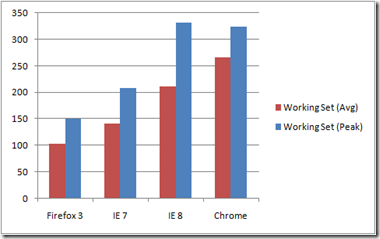
With a peak working set (324MB) just shy of IE 8’s updated 332MB mark, Chrome put a massive hit on available memory for our 2GB Windows XP (SP3) test system. And when we switched our focus to the average working set, Chrome actually topped IE 8 with an impressive 267MB footprint (compared to 211MB for IE 8).

image
Figure 1 – Average and Peak Working Sets

Of course, both browser look absolutely porcine when compared to the lean, mean Firefox 3.01 (151MB peak, 104MB average working set size). And lest we forget, IE 7 continues to hover somewhere between the fit & trim Firefox and the obesity that defines Chrome/IE 8 (209MB peak, 142MB average).

One area where the Mozilla.org byproduct shares common ground with Chrome is average CPU utilization. Both products chew-up CPU bandwidth much more aggressively than either of the IE variants, with Chrome actually outpacing Firefox by 2 percentage points (45% to 42% for FF). Contrast these numbers with IE 8 (24%) and IE 7 (13%) and you begin to see that, when it comes to gobbling up CPU cycles, Chrome and Firefox are in fact birds of a feather.

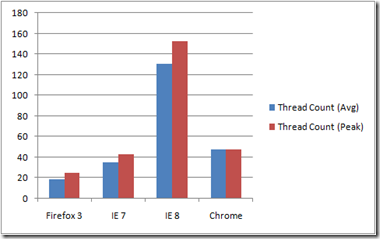
Interestingly, the one place where Chrome completely befuddled us was in its use of threading. Both Firefox and IE 7 spawn a relatively modest number of threads (25 and 43, respectively), a fact related to their reliance on a single process instance to handle all tabbed sessions. By contrast, IE 8 spawns potentially hundreds of threads (153 in our latest test round), and spreads them out across its various instances (in our case, 6 discrete copies of iexplore.exe).

image
Figure 2 – Average and Peak Thread Count 

Given its use of a similar, multi-process model, we would have expected Google Chrome to introduce a comparable thread workload. So we were understandably surprised to discover that Chrome had spun a much more manageable 48 execution threads at the peak of the test scenario (10 sites loaded into 10 separate tabs). Even more surprising was how these threads were distributed: 25 of them belonged to the initial Chrome process instance (i.e. the one that’s created when you first start Chrome); the rest were distributed almost evenly across the other process instances – in our case, 2 threads per instance over 12 discrete instances (with one instance grabbing an extra 3 threads for unknown reasons).

Our guess – and it really is just that until we get confirmation – is that those initial 25 threads are there primarily to handle the base UI functions (client window, address bar, menus), and that all subsequent tabs/processes are created with just two execution threads to handle all of the the core rendering functions for that instance. It’s an interesting design, one likely made possible by Chrome’s modular architecture. And while it may not deliver the kind of massive parallelism that Microsoft seems to be shooting for with IE 8, it should serve to offset Chrome’s voracious appetite for memory. We shudder to think what Google’s browser would look like if it incorporated Microsoft’s overwhelming threading model.

Bottom Line: Chrome, like IE 8, is a browser designed with tomorrow’s hardware in mind. It’s use of a multi-process tabbing model – which, according to Google, helps isolate failures and protect complex web applications (like GMail or Google Docs) – means that it will always use more memory than Firefox, IE 7 and similar, single-process browsers. How such model will hold up under heavy use, especially on today’s hardware, remains to be seen.

Users may decide that the added protection of isolated tab processes is worth the cost in terms of browser “memory bloat.” However, Microsoft is also incorporating isolated tabs in IE 8, albeit on a smaller scale (just 6 process instances to host our 10 tabs – clearly not total isolation). And with its more granular threading model, Microsoft’s browser may hold an advantage as CPU core counts climb and customers embrace the next wave of PC platforms.

One thing’s for certain: The once sedate browser landscape just got a whole lot more interesting!

Read more...

Monday, September 1, 2008

Internet Explorer 8: Over 2x “Fatter” than Firefox

Internet Explorer 8 Beta 2 arrived last week amid great expectations and some heated controversy. The latter was due to Microsoft’s decision to adopt a standards-compliant rendering model that breaks a great many IE-specific web sites.

However, while various bloggers and pundits waxed breathlessly about all of the new bells and whistles (including the much-reported “porn mode”), we were busy putting Microsoft’s new browser under the microscope of the exo.repository.

Note: For more information on the exo.performance.network, or to register for your free Analysis Portal account, visit www.xpnet.com.

Over the course of several days, we evaluated IE 8 under both Windows XP (SP3) and Vista x86 (SP1) to determine how this major update behaves and what, if any, new burdens it might place on today’s over-taxed (in the case of Vista) Windows PCs.

What we found was another example of unchecked Microsoft  code “bloat,” complete with “shirt-bursting, waistline-stretching” memory consumption and the kind of CPU-hogging thread growth normally reserved for massively parallel server farms.

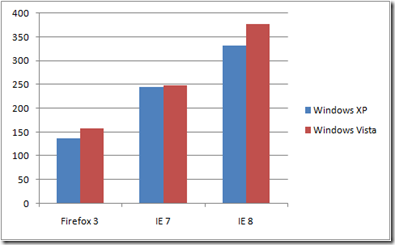
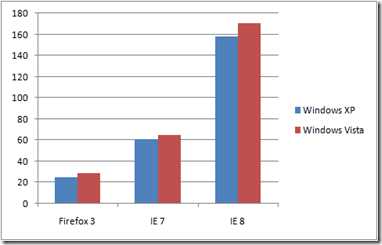
For example, on our Dell OptiPlex 745 (Core 2 Duo @ 2.66GHz) Vista/XP test bed with 2GB of RAM, IE 8 consumed just under 380MB of memory during a 10-site, multi-tab browsing scenario of popular general media, technical media and humor-related Web destinations (see bottom of this article for a list of sites).

By contrast, IE 7 consumed just under 250MB rendering this same workload, while Firefox 3.01 put both IE versions to shame by completing the same browsing scenario in just 159MB of RAM.

image
Figure 1 – Peak Browser Working Set Under XP/Vista

The story gets worse for IE 8 when you examine the number of threads spawned to complete the scenarios. Under Firefox, the count never exceed 29 concurrent threads. IE 7 spawned a hefty 65 execution threads, while IE 8 tried to choke the life out of the CPU with a massive 171 concurrent threads.

By comparison, the instance of Microsoft SQL Server 2005 x64 Edition that hosts the exo.repository rarely spins more than 100 concurrent threads – this on an 8-way, 8GB server machine servicing over 3000 actively monitored PCs.

image
Figure 2 – Peak Browser Thread Count Under XP/Vista

One area where IE 8 came out ahead of Firefox is in overall CPU utilization. Firefox consumed an average 33% Processor Time under XP (48% under Vista), while IE 8 took-up 22% of the CPU (33% under Vista) and IE 7 was the least aggressive at 13% (24% under Vista).

Considering how much faster Firefox is than IE 7/8 at displaying most web sites, the additional CPU cycles are understandable and likely attributable to a more efficient rendering engine employing fewer threads in exchange for faster linear performance.

Some observations:

  • With a massive working set approaching 20% of our test bed’s 2GB RAM configuration, IE 8 may be the long awaited “killer app” that drives customers towards 4GB+ systems and the 64-bit flavors of Windows Vista/7.
  • By greatly increasing the number of concurrent execution threads, and then spreading them out across multiple, discrete processes (in our case, 6 separate instances of iexplore.exe), Microsoft seems to be positioning IE 8 to take advantage of the greatly expanded core counts of future Intel and AMD CPUs – at the cost of overwhelming today’s single and dual-core PCs.
  • By delivering superior performance while maintaining a nearly 2x smaller memory and CPU footprint across the board, Firefox 3.01 proves once again that the open source community can often trump even the most well-funded commercial projects when it comes to delivering efficient, streamlined code.

Bottom Line: No matter how you slice the data, IE 8 represents a massive expansion of the baseline runtime requirements for Microsoft’s Internet Explorer web browser. Meanwhile, the Firefox folks continue to embarrass Microsoft by “doing it better” (including delivering superior performance and overall standards compliance) while consuming fewer hardware resources. How these efficiencies will play in the aforementioned multi-core future remains to be seen.

It may be that Microsoft’s focus on parallelism will reap dividends once the hardware catches up with the software - much like Vista has looked better as the Windows PC ecosystem has evolved to support its epically porcine girth. Such massively-threaded products will likely feel more at home on the 4, 8 and 16-core systems of tomorrow, but for right now they represent the worst kind of code bloat.


List of web sites visited as part of our test scenario:

Note: To ensure an accurate, rich-media experience, we installed both the Adobe Flash 9 and Microsoft SilverLight 2.0 (Beta) plug-ins under each tested browser/OS combination.

Read more...