Thursday, December 13, 2007

Office 2007 SP1 Yields Modest Performance Gains

During our most recent round of testing we covered Windows Vista with the Service Pack 1 Release Candidate bits running both Office 2007 and Office 2003. Now that Service Pack 1 for Office 2007 has been released we decided to revisit the tests with the updated bits for Word, Excel and PowerPoint in place.

Once again, we ran the tests on the same 2GHz Core 2 Duo Laptop (Dell XPS M1710) with 2GB of memory. Test methodology consisted of booting Vista, running an initial pass of OfficeBench, then running OfficeBench in a 10-iteration loop and recording the average loop time across the iterations.

The net result: A 3% improvement in OfficeBench completion times.

It would seem that, unlike the Vista team - which has the habit of over-promising and under-delivering - when the Office team talks about a performance boost they actually provide one. And while the results are far from earth-shattering - Vista SP1 + Office 2007 SP1 is still nearly 2x slower than the combination of Windows XP SP3 + Office 2003 - it's at least a step in the right direction.

Note: You can grab your free copy of OfficeBench, plus the rest of the DMS Clarity Suite tools, from the exo.performance.network web site. Just register for your free portal account, hook-up a couple of systems and help us build the world's first global repository of computer performance-related knowledge and data.

Read more...

Sunday, December 2, 2007

When Microsoft Attacks!

We at the exo.performance.network pride ourselves on having relatively "thick skins." After all, when you have the audacity to actually take a position on the issues - and then to back them up with hard data - you're bound to bring out the zealots on the other side. However, it's a rare treat when the shots sent our way hail from no less an industry authority than Microsoft.

Yes, it seems our little foray into Windows benchmarking has drawn the ire of Mr. Nick White, official "spokesmouth" for the Windows Vista team. In his blog/rant, Mr. White blabbers on a  bit about unrealistic benchmarking, then proceeds to badmouth our OfficeBench test script by calling it nothing more than a "window-open, window-close" routine. He even includes a ridiculously accelerated video of our test script in action, using the "speed" at which it executes as an excuse for discrediting its validity.

Of course he's wrong, both in his description of the test script and his justification for discrediting it. However, since his agenda likely had little to do with actually clearing the air - and was more in line with a classic Microsoft "hit" piece ordered from on high - we won't bother responding to Mr. White directly. However, we will take a moment to explain how OfficeBench works and why it's garnered so much respect over the years:

  1. OfficeBench's origins can be traced to our sister company, Competitive Systems Analysis, Inc. It was designed by Mr. Randall C. Kennedy while his company was under contract to Intel's Desktop Architecture Labs (DAL). This was way back in the 1999/2000 timeframe, when CSA was responsible for a great deal of internal benchmarking and white paper development surrounding the Pentium III and Pentium 4 CPU launches, among other projects.

    Why is this important? Because it helps to establish the origins of the technology.

  2. The OfficeBench test script was designed from the beginning to be a "run anywhere" benchmark. By "run anywhere" we mean that the script will execute reliably under almost any Windows runtime environment. At the time it was being developed, this meant Windows 2000 and Terminal Server. As Windows evolved, so did OfficeBench, until now it supports every version of Windows since 2000, including XP, Vista, Server 2003, Server 2008, all flavors of Terminal Server and all known application and desktop virtualization environments. When we say "anywhere," we really mean it.

    Why is this important? Because it allows us to test across multiple generations of Windows.

  3. OfficeBench is also version independent. That is, it's designed to work with any version of Microsoft Office. When it was originally conceived, the state of the art was Office 2000. Since then, Microsoft has rolled out 3 additional versions: XP, 2003 and, most recently, 2007. Once again, OfficeBench runs unmodified across all four versions of Office. Combine this with the support for the various Windows platform releases and you begin to see why OfficeBench is so powerful: It is the only test script of its kind that allows you to compare performance across multiple generations of Windows and Office. Mix them, match them - it just works.

    Why is this important? Because it allows us to test across multiple generations of Office.

  4. Mr. White's hatchet job aside, OfficeBench is in fact a fairly complex test script. For starters, it uses OLE automation to drive the applications. This is different from most test scripts, which use window messages or key stroke/mouse click simulation. Using OLE automation has numerous benefits, including allowing us to run unmodified across Office versions. It also factors out any input-related anomalies while eliminating the chance that a UI change or 3rd party modification will somehow break the script.

    As for Mr. White's assertion that it's a simple "window-open, window-close" script, I offer the following summary of key OfficeBench tasks:

    a. Reformat all section headers and subheads in Word.
    b. Generate multiple chart objects in Excel.
    c. Generate complete multi-slide presentation in PowerPoint.
    d. Multi-page scroll w/copy paste of chart objects into Word.
    e. Slide sort/apply multiple templates in PowerPoint.
    f. Multi-page scroll/print preview/print-to-file in Word.
    g. Multi-chart print preview/print-to-file in Excel
    h. Global search/replace in word (multiple).
    i. Multi-slide preview/print-to-file in PowerPoint
    j. Navigate simulated research web site in IE (multiple).

    Again, the above are just some highlights. There's a lot more going on than meets the eye, and the key is that it's the exact same set of tasks executing across all versions of Office.

    Why is this important? Because it shows that OfficeBench is a sophisticated test script that does more than merely "open and close windows."

  5. OfficeBench doesn't exist in a vacuum. It's delivered as part of a sophisticated, extensible, multi-process testing framework we call DMS Clarity Studio. With DMS Clarity Studio, we provide a variety of scalable workload objects for testing everything from client/server database connections to MAPI-based message store access to streaming multimedia. OfficeBench has been engineered to run in parallel with these workloads, providing for a rich variety of targeted test scenarios spanning the range of Windows client and server platforms. It's all coordinated through the DMS Clarity Studio framework and also seamlessly integrated with the exo.performance.network's Clarity Analysis Portal.

    Note: DMS Clarity Studio is offered for free as part of the exo.performance.network. It's also part of the larger DMS Clarity Suite framework in use across thousands of trading workstations and other mission critical systems in the financial services sector. Some of the largest trading firms in the world trust us - Devil Mountain Software, Inc. - to tell them when their systems are under-performing. Enough said.

    Why is this important? Because it shows that OfficeBench is part of a proven testing ecosystem that spans the range of Windows platforms and runtime scenarios.

In summary, OfficeBench is much more than a simple "window-open, window-close" script. It is a sophisticated, version-independent benchmarking tool that executes reliably under almost any Windows runtime environment. As such, it is the only tool of its kind that allows IT organizations to accurately assess multi-generational performance across all versions of Windows and Office.

And that's why OfficeBench scares the hell of out Microsoft. For the first time ever the industry has the tools necessary to call the company to the mat for its bloated, CPU cycle-sucking ways.

Microsoft's response? Slam the benchmark! Try to discredit the author/source! And crank-up the FUD machine!

Sorry, guys! You can run, but you can't hide, from OfficeBench.

Read more...

Thursday, November 29, 2007

Community Snapshot 01: Who's Using What?

As an ongoing service to the greater Windows IT community, we're publishing the first of our weekly "snapshots" of OS and application usage rates as measured within our own little corner of the industry. These numbers are current as of 06:00 GMT and based on a sample of set of 1,106 contributor systems:

Figure 1 - Contributor Usage by OS Type/SKU

Interpretation: While Windows XP (55%) still makes up the lion's share of our user base, Windows Vista - in its various incarnations - is running a closing second (37%). We'll be checking back each week to chart the progress of XP, Vista and their variations over time, and also to monitor adoption rates for Vista SP1 and XP SP3 when they're released early next year.

Read more...

Wednesday, November 28, 2007

How to Make Vista Run Like XP (Sort of)

In an effort to further clarify our previous test results, we decided to experiment a bit with Vista to see how it would perform with a majority of its newer UI elements and background services turned off. In the process, we believe we've come up with a roadmap of sorts for how to "make Vista run like XP" (sort of):

  1. Shutdown "Unnecessary" Services - This means killing all those new Vista goodies, like SuperFetch and the WSearch indexer. CPU cycles are a precious commodity - use them wisely.
  2. Ditch the UI - Use the Advanced System Settings dialog to change the Appearance settings to "adjust for best performance." It's like taking a trip back in time...to 1995!
  3. Drop the Resolution/Color Depth - This helps to mitigate any sluggishness in the newer Vista-model drivers. 1024x768 with 16-bit color should be good for most video adapters - and it looks "real sharp" stretched across that new 21 inch LCD!
  4. Handicap XP - Most Windows XP users are running Office 2000, XP or 2003. Upgrade the XP config with Office 2007 to ensure that you get a nice, entirely unrepresentative (of the real world) hybrid scenario.

Do the above and you'll be rewarded by a much closer net experience. Instead of being ~2x slower than XP, Vista in this new, "bare metal" configuration is *only* (drum roll, please)...40% slower!

Bottom Line: Even with the OS stripped to the core, and with all of the new eye-candy and CPU-sucking background services turned off, Vista is *still* 40% slower than XP (SP3) at a variety of business productivity tasks. Time to ask Santa for that new PC for Christmas!

Read more...

Tuesday, November 27, 2007

Update: Re-Testing Vista w/2GB RAM, Office 2003

Many of our members have requested that we re-test Vista SP1 with 2GB of RAM instead of the 1GB we used in our original tests. So, without further delay, we present our revised results table:

image

Figure 1 - Revised OfficeBench Completion Times (Seconds)

Analysis: By providing Vista (SP1) with an additional 1GB of RAM (that's a total of 2GB for those of you keeping score) we managed to achieve a "whopping" 4% improvement in OfficeBench throughput.

Note: We added the Windows XP (SP3) results to the chart to add further context to the Vista results. As before, all tests were conducted on the same Dell XPS M1710 system w/2GHz Core 2 Duo CPU and DDR-2 667MHz RAM.

A few members voiced their concerns over the use of Office 2007 under Vista. They suggested we re-test using Office 2003 on both Vista and Windows XP. Here are the results:

image

Figure 2 - Office 2003 vs. Office 2007 Completion Times

Analysis: Moving from Office 2007 to Office 2003 definitely improved Vista's showing. Instead of being over 2x slower than XP on the same OfficeBench workload, Vista is now "only" 1.8x slower.

To quote Darth Vader: "Impressive...most impressive."

Read more...

Friday, November 23, 2007

Windows XP SP3 Yields Performance Gains

After a disappointing showing by Windows Vista SP1 (see previous post), we were pleasantly surprised to discover that Windows XP Service Pack 3 (v.3244) delivers a measurable performance boost to this aging desktop OS. Testing with OfficeBench showed an ~10% performance boost vs. the same configuration running under Windows XP w/Service Pack 2.

 image

Figure 1 - OfficeBench Completion Times
(In Seconds - Lower is Better)

Note: As with our Vista SP1 testing, we used the identical Dell XPS M1710 test bed with 2GHz Core 2 Duo CPU, 1GB of RAM and discrete nVidia GeForce Go 7900GS video.

Since SP3 was supposed to be mostly a bug-fix/patch consolidation release - unlike w/Vista SP1, Microsoft made no promises of improved performance for XP - the unexpected speed boost comes as a nice bonus. In fact, XP SP3 is shaping-up to be a "must have" update for the majority of users who are still running Redmond's not-so-latest and greatest desktop OS.

Of course, none of this bodes well for Vista, which is now more than 2x slower than the most current builds of its older sibling. Suffice to say that performance-minded users will likely choose to stick with the now even speedier Windows XP - at least until more "Windows 7" information becomes publicly available.

Windows Vista = Windows ME "Reloaded?" You be the judge!

Read more...

Sunday, November 18, 2007

Vista SP1 a Performance Dud

Note: We've updated our data set to include results from Vista with 2GB of RAM and also with Office 2003 instead of 2007. Check out our revised numbers here.


With the initial performance characteristics of Windows Vista leaving much to be desired (see our previous post on the subject), many IT organizations have put off deploying the new OS until the first service pack (SP1) is released by Microsoft early next year. The thinking goes that SP1 will address all of these early performance issues and somehow bring Windows Vista on par with - or at least closer to - Windows XP in terms of runtime performance.

Unfortunately, this is simply not the case. Extensive testing by the exo.performance.network (www.xpnet.com) research staff shows that SP1 provides no measurable relief to users saddled with sub-par performance under Vista.

How We Tested

The above conclusion is based on an analysis of the RC0 (v.658) build of Service Pack 1 for Windows Vista. Testing was conducted on a dual-core Dell notebook with 1GB of RAM. The staff ran a variety of test scenarios against both "before" (RTM w/no updates) and "after" (RTM w/SP1 installed) configurations, using the DMS Clarity Studio testing framework to capture scenario scoring and metrics data for upload to the exo.repository.

  • During office productivity testing, the staff used the DMS Clarity Studio OfficeBench test script to drive Microsoft Office 2007 through a scripted set of productivity tasks, including creating a compound document and supporting workbooks and presentations materials.
  • To test multitasking performance, the staff used the ADO, MAPI and WMP Stress modules - all part of DMS Clarity Studio - to generate a multi-process workload scenario involving client/server database, workflow and streaming media tasks.

Note: DMS Clarity Studio is available as a free download from the exo.performance.network (www.xpnet.com) site. Simply register for your free DMS Clarity Analysis Portal account to access these and other free tools from xpnet.

Test Results

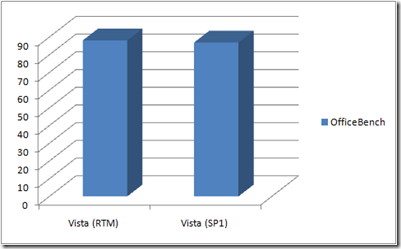
During OfficeBench testing we noted a statistically insignificant delta (~2%) in favor of the SP1-patched configuration. CPU Saturation, Memory Pressure and I/O Contention factors were all comparable, as were process specific metrics - including the Thread Utilization and Thread Growth Potential Indices.
image

Figure 1 - OfficeBench Completion Times (Seconds)

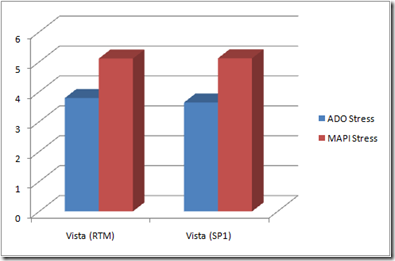
The multitasking scenario was also comparable, with the ADO and MAPI Stress workloads showing a delta of less than 1% in favor of the SP1-patched configuration. As with the OfficeBench test scenario, system and process metrics for CPU, Memory and I/O were all nearly identical between the two configurations.
image

Figure 2 - ADO and MAPI Avg. Transaction Times (Seconds)

Note: For more information on the various system and process metrics employed in this article, please login to your private DMS Clarity Analysis Portal site and refer to the Glossary section of the Online Help

Not yet a member of the exo.performance.network? Sign up today! It's free, and you'll be helping us to build the world's first global repository of computer performance-related knowledge and data.

Conclusions

After extensive testing of both RTM and SP1-patched versions of Windows Vista, it seems clear that the hoped-for performance fixes that Microsoft has been hinting at never materialized. Vista + SP1 is no faster than Vista from the RTM image.

Bottom Line: If you've been disappointed with the performance of Windows Vista to date, get used to it. SP1 is simply not the panacea that many predicted. In the end, it's Vista's architecture - not a lack of tuning or bug fixes - that makes it perform so poorly on systems that were "barn-burners" under Windows XP.

Read more...